PWD · LGED · RHD · BWDB

Estimating software that works from the government's own figures — and shows you the working.

Four Schedules of Rates — PWD, LGED, RHD and BWDB — with zone-wise rates, inaccessible-area uplift, quantity take-off with a full bar bending schedule, PLAR, BoQ import and print-ready sheets. For PWD, open any item and see the rate built up line by line — materials, labour, plant, mark-ups and VAT. All of it on your own machine, with no internet.

Use it free for 14 days Windows · no card · your figures stay on your machine

বাংলা ও ইংরেজি — দুটো ভাষাতেই। The software opens in Bangla and switches to English whenever you want, one press. Item descriptions stay in the book's own words either way — those are what a tender gets checked against.

PWD Schedule of Rates 2022 · Chapters 07 & 08
07.1.1
RCC WORKS 1:2:4 · f′c = 19 MPa Individual & combined footing, pile cap, raft/mat, floor slab and foundation beam up to plinth level
cum
10,577.00per cum
07.2.1
RCC WORKS 1:1.5:3 · f′c = 22 MPa Individual & combined footing, pile cap, raft/mat, floor slab and foundation beam up to plinth level
cum
14,521.00per cum
02.1.2
EARTHWORK Earthwork in excavation in foundation trenches up to 1.5 m depth and maximum 10 m lead
cum
173.00per cum
Change the zone — the software moves the rates exactly this way, with the inaccessible-area uplift on top where the book applies one.
01 · What is in it

Four government books, and your own rate list

Each book brings its own zones, its own appendix and its own rules. No rate has been guessed at: what the book prints is what the software shows.

PWDSchedule of Rates 2022 (2nd Rev.) · Civil Works · 4,182 items
LGEDSchedule of Rates · appendices included
RHDSchedule of Rates · roads and bridges
BWDBSchedule of Rates · water development
Own SoRYour organisation's own rates — bring them from Excel and set them beside the book
02 · Every rate, opened up

Materials, labour, plant, mark-ups and VAT — the way PWD built the number

Every analysis returns to the printed rate

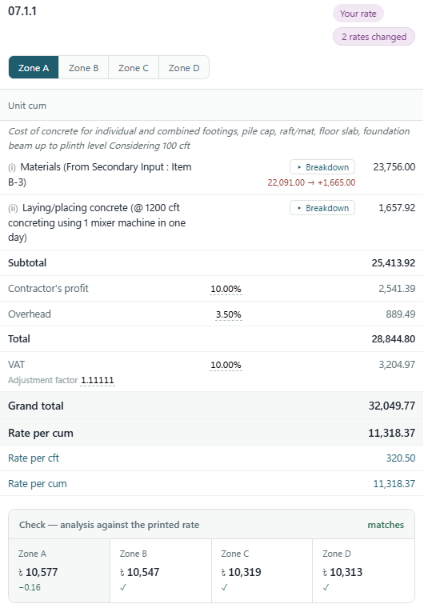
Before a breakdown is shown it is recalculated and checked against the rate the schedule prints. Where it does not reconcile, we say so rather than show you a figure that looks right.

Rate analysis for PWD item 07.1.1 with two basic rates changed, checked against the printed rate in all four zones
Item 07.1.1 — RCC 1:2:4 with brick chips. Every line traced back to the schedule's own basic rates, checked against the printed rate in all four zones.

Change cement once. It reaches every item that uses it

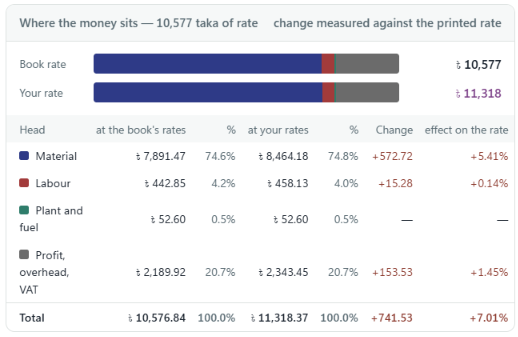
Basic rates live in one list. Edit a price there and every analysis built on it moves — no going item by item. The effect is traced through every head to the rate you quote.

Where the money sits: the book's rates against your rates, head by head
Raise the price of cement and the effect is traced through every head — material, labour, plant and mark-ups — to the rate you quote.

Four zones, four rates, one calculation

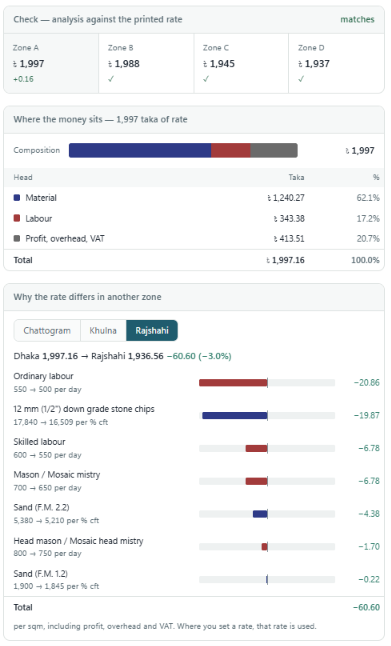
Dhaka, Chattogram, Khulna and Rajshahi each carry their own basic rates, and the analysis follows all four. Pick another zone and it shows why the rate differs there: which labour and which materials, by how much, adding up to the difference.

  • Opens beside the item — no page change, no losing your place
  • Nested blocks open in line: the concrete inside the concrete
  • Put in your own market rate for one line, or everywhere at once
  • Cost composition: how much of every 100 taka is material, labour, plant
  • Print the analysis sheet, or take it to Excel — in Bangla or English
  • Share one rate set across an office in a single file

Rate analysis is available for the PWD schedule. LGED, RHD and BWDB carry the full rate tables, take-off and estimating tools; LGED items that the book takes from PWD open the PWD analysis.

Why a mosaic floor item costs 60.60 taka less in Rajshahi than in Dhaka, input by input
Dhaka against Rajshahi for one mosaic item: labour and stone chips account for most of the 60.60 taka.
03 · What it does

From looking a rate up to printing the sheet

Find an item by code or by description

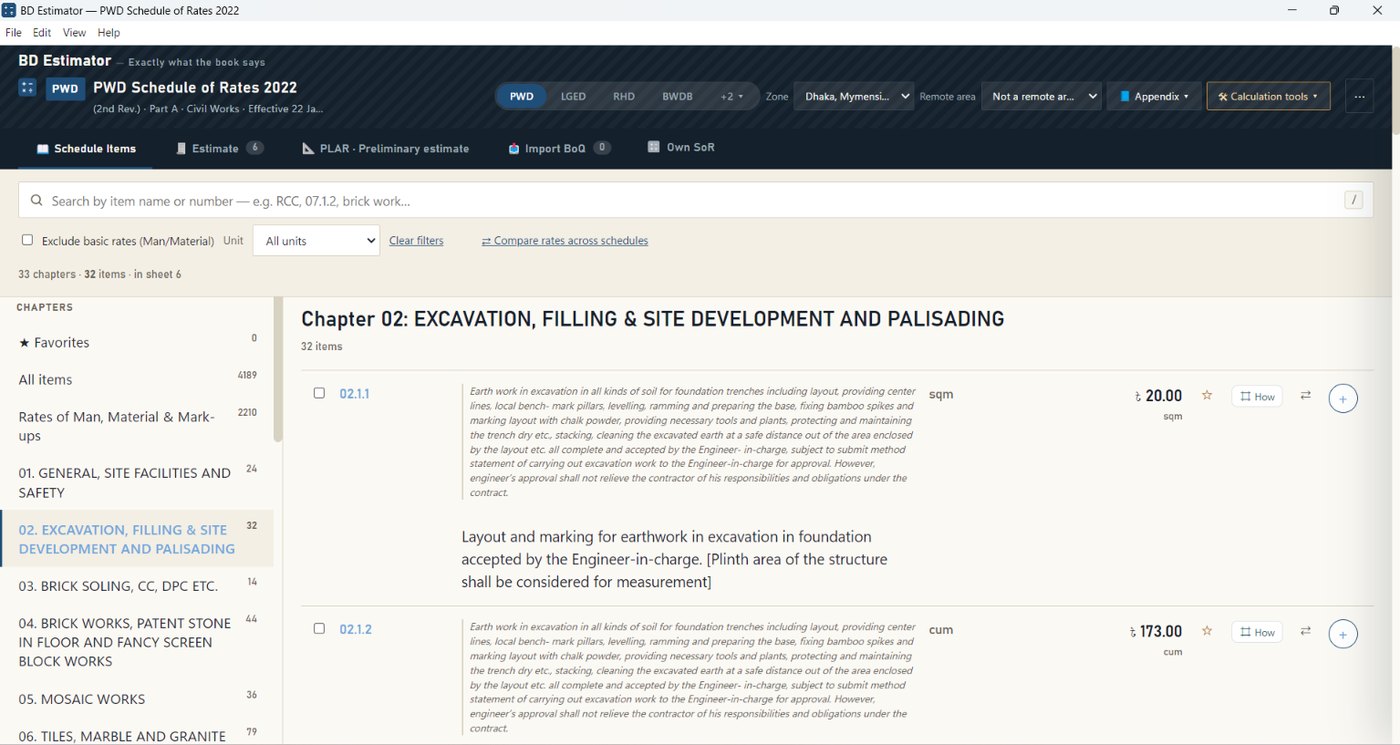
Browse by chapter or search by name. Change the zone and every rate follows. The basic rates — labour and materials — can be hidden to leave only the work items.

Chapter 02 of the PWD SoR: the item list with rates
Schedule items · PWD 2022

Build the estimate, tender rebate and all

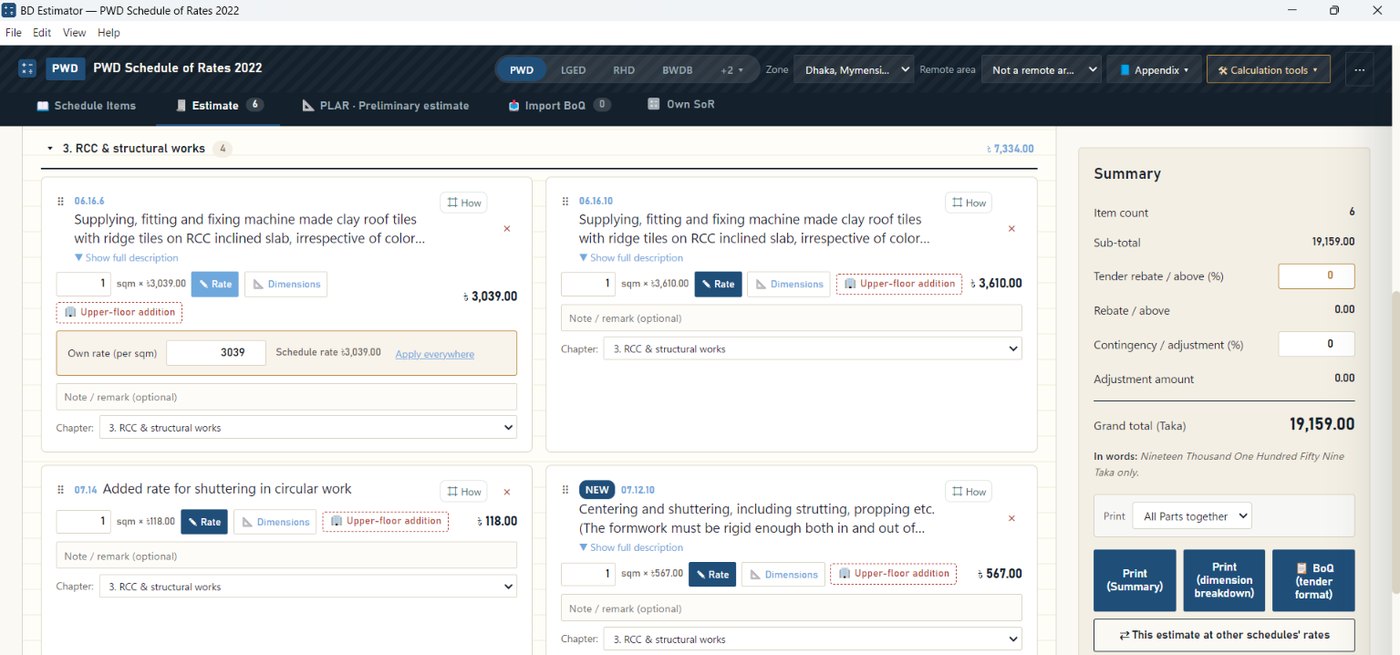
Enter quantities, split the job into parts, apply a rebate and a contingency. The upper-floor addition goes on with one press. The total is written out in words for you.

The estimate sheet with RCC items and the summary down the right
Estimate · summary and totals

Quantity take-off, with a full bar bending schedule

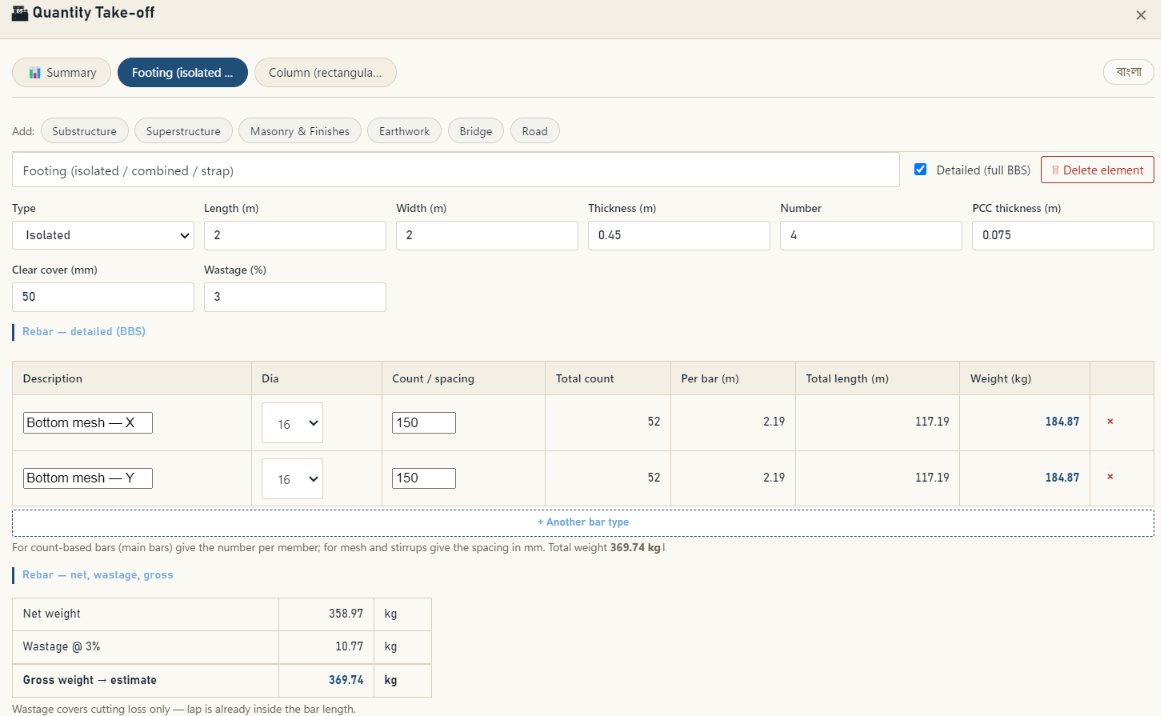
Footings, columns, beams, slabs, piles, stairs — put in the dimensions and the concrete, shuttering and steel come out. The steel comes as a full BBS: count, length and weight bar by bar, with net, wastage and gross kept apart. The result drops straight into the estimate.

Quantity take-off showing the detailed bar bending schedule for an isolated footing
Take-off · bar bending schedule

Compare rates — across books, across zones

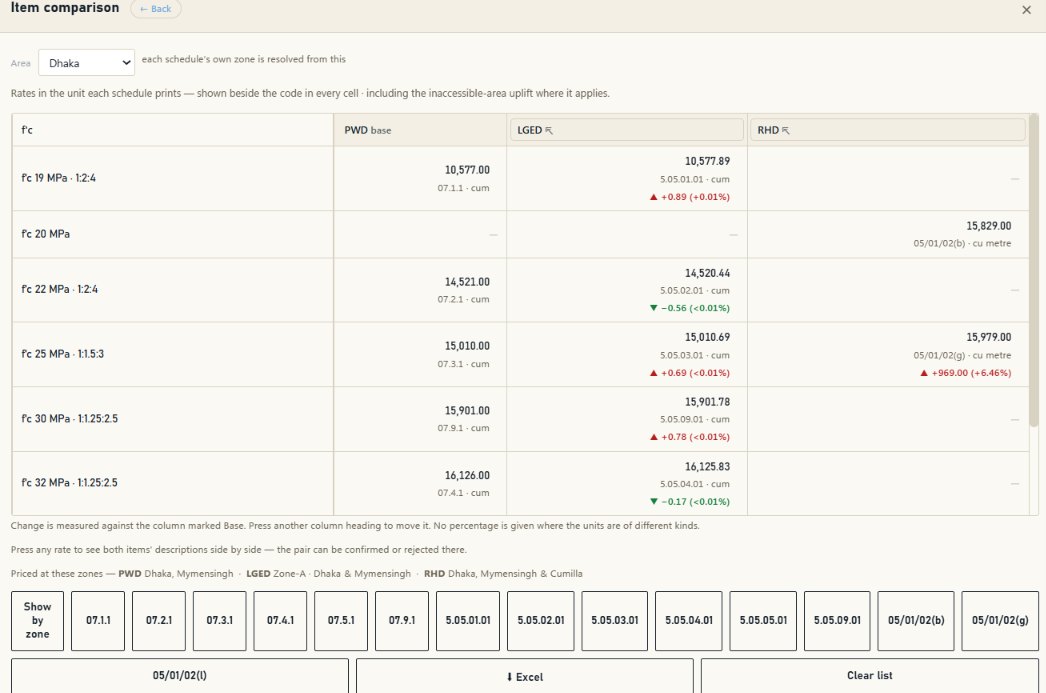
What the same work costs under PWD and under LGED. What it costs in another zone against your own — in taka and in per cent. Where the units differ the figure is converted; where they cannot be bridged the software says so instead of inventing a percentage.

Or take the whole estimate: see what it would come to at every other book's rates, item by item, measured against the base you choose.

Press any rate and the two descriptions open side by side, with the words that differ marked. Confirm the pair or remove it; the software keeps your decision for every estimate after.

RCC rates by concrete strength compared across PWD, LGED and RHD, with the difference in taka and per cent
Comparison · across books

Write a measurement however you think of it

No converting to metres in your head. Type it the way it is on the drawing and the software shows what it made of it, under the field, before you move on.

What you typeWhat it reads
=10ft3.048 m
=.3+.20.5 m
=2*48
=2in50.8 mm
4′6″1.372 m

PLAR — the preliminary estimate

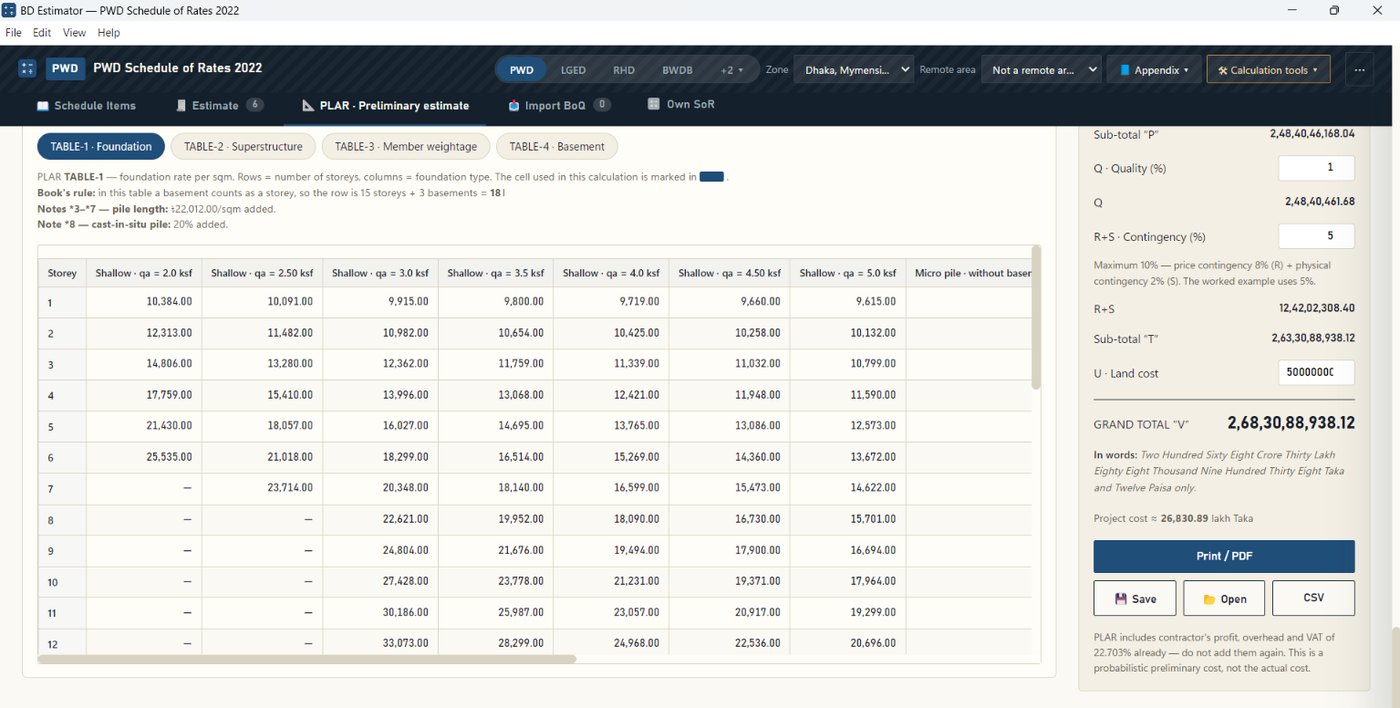
Give the storeys, the foundation type and the soil bearing capacity, and the preliminary cost comes out of TABLE-1 to TABLE-4 of the book. The cell each figure was taken from is marked in the table, so you can check it rather than take it on trust.

The PLAR preliminary estimate beside the source tables
PLAR · Annexure A & B

Why not just a spreadsheet?

Most estimates in this country are built in one, so it is a fair question. The answer is not that spreadsheets are bad — it is that a spreadsheet does not know what the book says.

In a spreadsheetHere
Rates typed in once, from whichever copy of the book was on the desk that day All four books built in, with the edition and effective date on screen
Change zone and every rate has to be found and retyped Change zone and the rates move, with the inaccessible-area uplift following
An item number mistyped is a mistake nobody catches Items come from the schedule, so the number and the description agree
Bar bending on a separate sheet, or by hand Dimensions in; concrete, shuttering and a full BBS out
Somebody else's BoQ checked line by line Import it and read the book's rate beside the quoted one
The tender format rebuilt for every job Print-ready, with signature lines and page numbers

It still ends in a spreadsheet when you want one — the Excel export carries live formulas and one tab per part, so you can go on working in the tool you already know.

Print or export it the way the office wants it

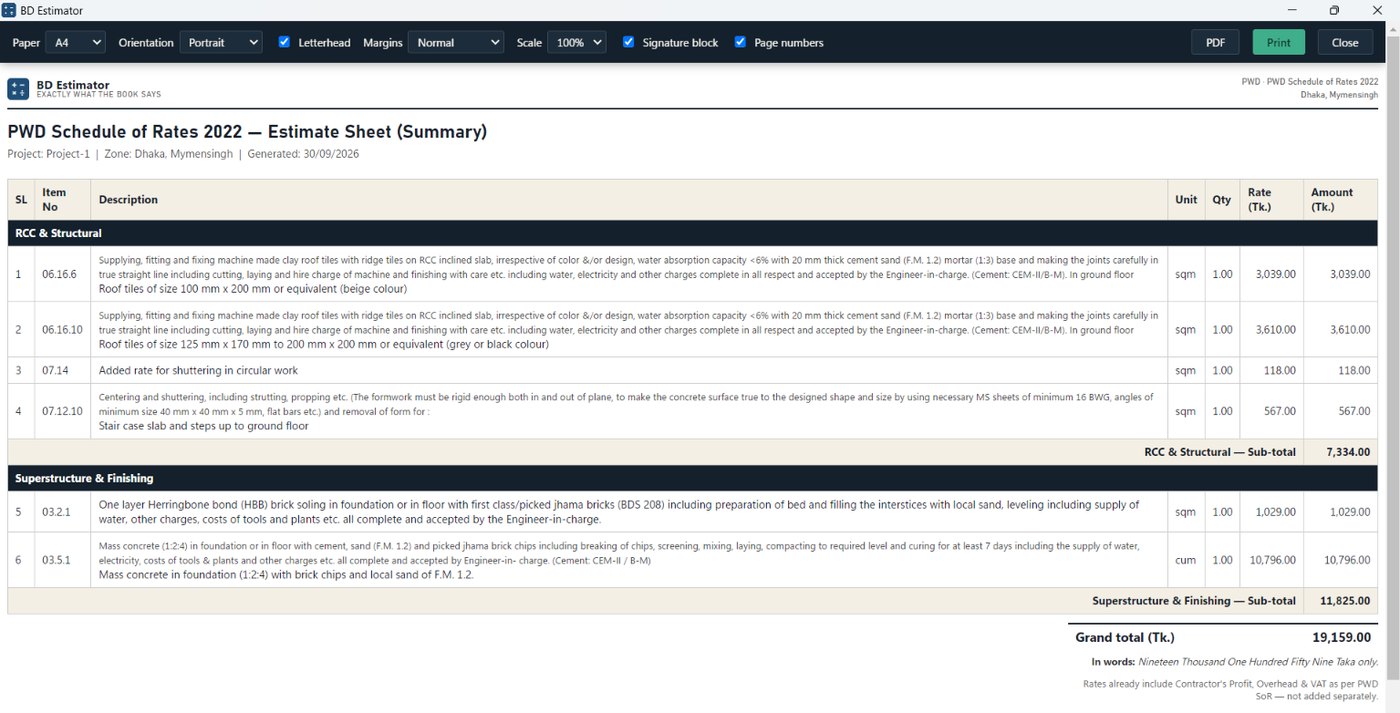
Summary, dimension breakdown, or BoQ in tender format. CSV and Excel as well. The letterhead, the project name and the Ref ID sit on the sheet where they belong.

A print-ready estimate sheet with the paper, margin and signature settings above it
Print · summary sheet
03 · Pricing
First 100 customers · half price

You pay for the time you use it

These are the rates for the first hundred customers — half the regular price. Anyone who buys at them renews at them too.

Personal

2 computers
  • 3 months৳1,598৳799৳266 a month
  • 6 months৳2,998৳1,499৳250 a month
  • 12 months৳5,798৳2,899৳242 a month · best value

For one engineer, on a desktop and a laptop.

For an office

Official

7 computers
  • 3 months৳2,598৳1,299৳433 a month
  • 6 months৳4,998৳2,499৳417 a month
  • 12 months৳9,798৳4,899৳408 a month · best value

One licence for the section — seven machines, one key, one renewal date. Works out at under ৳60 a month per computer.

Fourteen days first, then decide

The whole program runs for fourteen days before any money changes hands — no key, no card, no registration. Build a real estimate of your own with it, and decide after that.

04 · How to buy

Send the money on bKash and it unlocks at once

There is no waiting for approval. The moment you submit the TrxID the software runs in full for 48 hours, and within that time the payment is checked and the licence made permanent.

  1. Send the money on bKashSend Money, to a personal number.
    01681850840
  2. In BD Estimator, ⋯ → LicenceThen I've paid.
  3. Give the plan, term, name, phone and TrxIDIt shows you the amount to send.
  4. It unlocks immediatelyFor 48 hours, with nothing held back.
  5. Permanent licence within 48 hoursIf anything sticks, write to support@bdestimator.com.
05 · Download

Install it and use it free for 14 days

Windows 10 and 11, 64-bit. No administrator password is needed to install. When a new version comes out the software will tell you — and ask before it downloads anything.

Windows may show a blue screen while installing

If “Windows protected your PC” appears, press More info then Run anyway. It is not a virus warning. Windows shows it for any new program until a large number of people have installed it, and it stops appearing on later updates once this one is installed.

06 · Questions

What people ask

Does it work without internet?

It does. Every rate in the books is inside the program, and every calculation happens on your own PC. The licence needs checking from time to time — after thirty unbroken days offline it will want a connection once.

Can you see my estimates?

No. Estimates, project names, rates — none of it reaches our server. A licence check sends the licence key and an identifier for the machine, and nothing else. Privacy policy

Which items have a rate analysis?

Almost every PWD item the book gives one for. Where the book sets a rate directly — an added rate for one more floor, a laboratory testing fee — the panel says so instead of inventing a build-up. LGED items the book records as taken from PWD open the PWD analysis; RHD and BWDB have no analysis.

How do I know the breakdown is right?

Every analysis is recalculated and checked against the rate the schedule prints, in all four zones. You see the result on the panel — matches, or the size of the gap. Where an analysis does not come back to its printed rate we do not show it at all.

Can I use my own market rates?

Yes, and in two ways. Click a price on one line to change it there alone, or open the basic rate list and change it everywhere at once — change cement once and every analysis built on it moves. You can also move the profit, overhead and VAT percentages.

Does that change my estimate?

Not until you say so. The estimate uses the schedule's printed rate, and the panel always states which rate will be used. Open the panel from an estimate row and a button appears to put your calculated rate on that row — with a way back to the schedule rate at any time.

Can the office work from one set of prices?

Export a rate set to a single file and import it on the other machines. The file carries the name of each rate beside its price, so if the schedule is updated and a row moves, the import tells you rather than applying a wrong price silently.

Can I run it on two computers?

Two on Personal, seven on Official. If you change computer the old one can be released — write to support@bdestimator.com.

What happens when a new edition of a book comes out?

If it appears within your term the software updates itself to it, at no extra cost.

Can I bring in my own organisation's rates?

Yes. Import them from Excel — up to six separate lists. They sit beside the government book for comparison, and two of your own lists can be set against each other as well, so 2025 against 2026 works the same way.

Can I do the bar bending schedule here?

Yes. Put the dimensions into quantity take-off, element by element, and the concrete, shuttering and steel all come out — laps and wastage included. It goes straight into the estimate.

Are the rates current? Which edition of each book?

PWD Schedule of Rates 2022, 2nd Revised, Part A Civil Works, effective 22 January 2026. LGED Schedule of Rates 2022, 3rd Edition, August 2025. RHD Schedule of Rates 2022, updated March 2023 and effective from the 5th. BWDB Schedule of Rates 2022, four zones. Whichever book you are in, its edition and effective date is printed across the top of the window. A new edition published within your term is a free update.

Can I enter measurements in feet and inches?

Yes. 4′6″, 4'6", 4.5 ft — write it however you think of it and it is read in metres, showing you what it made of it under the field.

Can I get the figures into Excel?

Yes, as CSV or as Excel. A BoQ can also be printed in tender format. It works the other way too: a BoQ somebody sends you can be imported and set against the book's items.

How soon after I pay does it unlock?

At once. Submitting the TrxID runs the whole program for 48 hours, and within that time the payment is matched and the full term set.

Does it run on Mac or on a phone?

Windows only for now. A Mac version is planned, without a date.